Last reviewed: October 2026. This is a reference for both sides of a ping-post integration, message by message. It describes the general process used across the lead generation industry, not the internal setup of any one company or software platform, and every integration sets its own fields, timeouts and rules. For the fields Summit Leads sends its own buyers, see ping/post integration for buyers.
Key points
- The ping carries enough to price the lead and nothing that identifies the consumer.
- A buyer that does not answer before the timeout is treated as a no bid.
- Only the winner receives the post, and the post quotes the bid it is answering.
- A rejected post can fall back to the next bidder or a waterfall of buyers.
- The consent certificateConsent certificateA record, often produced by a third-party consent certificate provider, that shows how and when a consumer gave consent on a web form. Glossary is flagged in the ping and travels in full only in the post.
The whole exchange in one diagram
The diagram follows one lead from the form to a sale. Each numbered step matches a section below.
Embed this diagram
You can use this diagram on your own site, in articles, slides and training material, with a credit link to this page. Copy the code below, or download the SVG file.
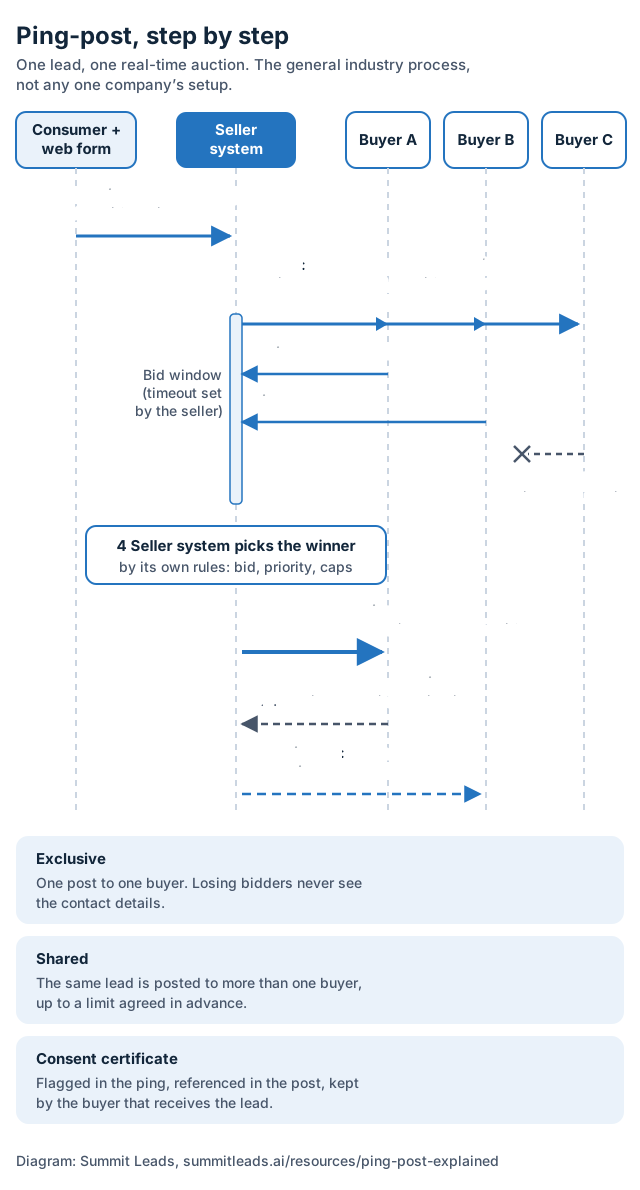
Form submitted
The consumer fills in the form and agrees to the consent language. A script on the page records the consent and creates a consent certificate.
Ping
The seller system builds a partial copy of the lead and sends it to every buyer whose filters and caps match.
Bids
Each buyer bids or passes. A buyer that does not answer before the response window closes counts as a no bid.
Winner
The seller system picks the winning bid by its own rules.
Post
The full lead, with contact details and the consent certificate reference, goes to the winner only.
Accept or reject
The buyer checks the post and answers. Accepted means sold.
Fallback
If the post is rejected or times out, the seller system can offer the lead to the next bidder or move down a waterfall.
The ping: what it carries and what it leaves out
A ping has one job: give a buyer enough to decide whether the lead is worth bidding on, without giving away who the consumer is. If a ping identified the consumer, every buyer that passed would still know about the lead, and the seller would lose control of who contacts the consumer.
| Field | In the ping | In the post |
|---|---|---|
| Vertical and sub-type | Yes | Yes |
| State and ZIP code | Yes | Yes |
| Qualifying answers (for example homeowner, project type, accident date) | Yes | Yes |
| Lead age or submission time | Yes | Yes |
| Consent captured / certificate present | A yes/no flag | The certificate URL or token |
| Source or sub-ID of the traffic | Often | Yes |
| Name, phone, email, street address | No | Yes |
| Bid ID from the winning bid | No | Yes |
Some integrations also put a hashed phone number or email in the ping, so the buyer can check for duplicates without seeing the real value. Whether that is allowed, and which hash is used, is part of the agreement between the two sides.
The ping is only sent to eligible buyers. Before anything goes out, the seller system checks each buyer’s filters (verticalVerticalThe industry or product category a lead belongs to, such as roofing or car accident. Glossary, geography, qualifying answers), its caps for the day or hour, and its schedule. A buyer that is capped or closed never sees the lead.
Bids: how a buyer answers a ping
Every buyer that receives a ping answers with a bid or a no bid. The buyer’s system decides automatically, using rules the buyer set up in advance, because there is no time for a person to look at each lead.
- A bid offers a price for the full lead and usually returns a bid ID. Many setups also let the bid say how long it stays valid.
- A no bid declines the lead. Buyers pass for reasons the seller cannot always see: the consumer is already in their system, a team is full for the day, or the lead is outside a narrower rule than the filters the seller holds.
- No answer inside the response window is treated as a no bid. A slow buyer loses the lead even if it would have bid the most.
A bid is a promise to buy that exact lead on the agreed terms if the post matches the ping. That is why the post quotes the bid ID back, and why a post whose fields differ from the ping can be rejected.
The winning post
When the response window closes, the seller system picks the winner by its own rules. The highest bid is the common rule, but many setups add a priority order between buyers, a minimum the seller will accept, or a preference for buyers with good acceptance and returnReturnA buyer's request for credit on a lead that fails agreed standards, such as a disconnected number, a duplicate or a lead outside the filters. Glossary history. The rules belong to the seller and should be written into the agreement.
The post goes to the winner only. It carries the full lead record, the bid ID, and the consent certificate reference. The buyer’s system then runs its own checks, such as duplicateDuplicateA lead for a consumer the buyer has already received within a set lookback period, from the same source or another one. Glossary checks, phone and email validation, and making sure the fields match the ping, and answers inside a post timeout.
- Accepted: the lead is sold at the winning bid, and the buyer’s team can contact the consumer.
- Rejected: the lead is not sold to that buyer. A useful rejection names the reason (duplicate, invalid phone, field mismatch), because the seller uses it to fix the source or the mapping.
Rejections after a winning bid are tracked closely on both sides. A buyer that wins often and then rejects often is effectively seeing leads it does not pay for, so sellers watch post rejectionPost rejectionWhen a buyer declines a lead at the post stage after winning the ping, for example because of a duplicate or a failed validation. Glossary rates when they set priority.
Timeouts: what happens when a system is slow
There are two clocks in every exchange, and each integration sets its own values for them.
| Timeout | What it limits | What happens when it runs out |
|---|---|---|
| Ping timeout (response window) | How long the seller system waits for bids | Any buyer that has not answered is treated as a no bid, and the auction goes ahead with the bids it has. |
| Post timeout | How long the seller system waits for the winner to accept or reject | The post is treated as failed, and the seller system moves to its fallback step. |
The windows are kept short because the consumer is usually still on the thank-you page, and the first call is most likely to connect while the request is fresh. A buyer whose system is slow loses leads to timeouts without ever seeing a no in its reports, so it is worth asking the seller for timeout counts during testing.
A post that times out is the awkward case: the buyer may have received and stored the lead even though the seller never got an answer. Agreements should say what happens then, for example that the seller will not resell a lead it has already posted unless the buyer confirms it rejected it.
Fallback and waterfall
A rejected or timed-out post does not have to mean an unsold lead. Most seller systems have a fallback, and the two common patterns are below.
- Next bidder: the lead goes to the second-best bid from the same auction, if that bid is still valid. The second buyer receives the post exactly as the winner would have.
- Waterfall: the lead moves down an ordered list of buyers, one at a time, until one accepts. The list can include buyers that take direct posts at prices agreed in advance, so a waterfall often sits after the auction as its last step.
Fallback changes who can end up with a lead, so both sides should know the order. A buyer that agreed to exclusive leads should be sure that a lead it rejected is not later posted to it again from another step, and a seller should make sure that every buyer in the waterfall is covered by the same consent as the auction buyers.
Ping-post and waterfall are often presented as rivals. In practice they are steps in one ping tree: the auction prices the lead when several buyers want it, and the waterfall finds a home for it when the auction does not. The trade-off between a live auction and a fixed-price direct post is covered in ping/post vs direct post.
Exclusive vs shared in ping-post
Ping-post works for both exclusive and shared leads. What changes is how many posts go out after the auction, and what a bid means.
| Point | Exclusive | Shared |
|---|---|---|
| Posts per lead | One, to the winner | More than one, up to a limit agreed in advance |
| What a bid buys | The only copy of the lead | One of several copies |
| Losing bidders | Never receive contact details | Never receive contact details (only winners do) |
| Consent | Must cover the one buyer that receives the lead | Must cover every buyer that receives the lead |
| What the buyer should ask | How exclusivity is enforced across fallback steps | The maximum number of buyers per lead, and whether it can change |
The ping does not always tell a buyer whether the lead will be sold once or several times. That is set in the buyer’s campaign and the agreement, so it is worth confirming in writing. The wider trade-offs are in exclusive vs shared leads.
Where the consent certificate travels
The consent certificate is the record a buyer relies on if a call or text is ever challenged. It follows the lead through the exchange like this:
- On the form: a script on the page records the consent language shown, the page, and what the consumer did, and creates a certificate with its own URL or token.
- In the ping: usually only a flag that a certificate exists (and sometimes the consent wording version), so buyers can skip leads without one. The certificate itself is not sent, because it can show the consumer’s details.
- In the post: the certificate URL or token travels as a field, for example a TrustedForm certificate URL or a Jornaya LeadiD token field.
- After acceptance: the buyer stores or claims the certificate under its own account, inside the time the certificate provider allows, and keeps it with the lead record.
Two points cause most problems. First, the consent language on the form has to cover the business that ends up calling, so a buyer added through fallback needs the same coverage as the auction winner. Second, a certificate that is never stored or claimed may not be retrievable later. The details, including who holds the consent in a ping-post chain, are in ping/post and TCPA consent and TCPA record keeping. This page is a general explanation, not legal advice.
Questions to settle before going live
Both sides can use this list during setup. Each item is something that is easy to agree on before live traffic and hard to sort out after a dispute.
- Which fields are in the ping, and does any of them identify the consumer?
- Is a hashed phone or email sent for duplicate checks, and which hash?
- What are the ping timeout and the post timeout?
- How is the winner picked: highest bid, priority, a minimum, or a mix?
- What happens after a rejected or timed-out post: next bidder, waterfall, or nothing?
- Is the lead exclusive or shared, and what is the maximum number of buyers?
- Which consent certificate field is in the post, and who stores or claims it?
- Which rejection reasons are accepted, and how are they reported back?
The lead spec sheet is a printable way to write down the buyer side of these answers.
Ping-post glossary
The terms below are in the order a lead meets them. The full lead generation glossary covers the wider industry.
- Ping
- The first message: a partial, non-identifying copy of the lead sent to eligible buyers so they can decide whether to bid. It carries fields such as vertical, state or ZIP code and qualifying answers, but no name, phone number, email or street address.
- Eligible buyer
- A buyer whose filters, caps and schedule match the lead at that moment. Only eligible buyers are pinged.
- Filter
- A buyer rule based on lead fields, such as vertical, state, ZIP code, homeownership or accident details. A lead that fails a filter is not offered to that buyer.
- Cap
- A limit on how many leads a buyer takes in a period, such as per day or per hour. A buyer that has reached its cap is not pinged until the cap resets.
- Bid
- A buyer’s answer to a ping that offers a price for the full lead. A bid usually comes with a bid ID that the post must quote back.
- No bid
- A buyer’s answer that declines the lead. A missing answer inside the response window is treated the same way.
- Bid ID
- A reference returned with a bid. The seller system sends it with the post so the buyer can match the post to the bid it made.
- Response window (timeout)
- The time the seller system waits for answers. A ping timeout limits how long it waits for bids; a post timeout limits how long it waits for the buyer to accept or reject. Each integration sets its own values.
- Winning bid
- The bid the seller system chooses by its own rules, for example the highest bid, a priority order between buyers, or a mix of the two.
- Post
- The second message: the full lead, with contact details and the consent certificate reference, sent only to the buyer (or buyers, for a shared lead) that won.
- Accept / reject
- The buyer’s answer to the post. Accepted means the lead is sold at the bid. Rejected means it is not, usually with a reason such as a duplicate or a field that failed validation.
- Fallback
- What the seller system does when the winner rejects the post or does not answer in time: offer the lead to the next buyer instead of dropping it.
- Waterfall
- Offering a lead to buyers one after another in a set order, moving down the list until one accepts. It can run on its own or as the fallback after a ping-post auction.
- Ping tree
- The full set of buyers, filters, priorities and fallback steps that decides where each lead goes.
- Exclusive lead
- A lead posted to one buyer only. The other bidders never receive the contact details.
- Direct post
- Sending the full lead to a buyer with no ping first, usually at a price agreed in advance. Often used as a fallback step in a waterfall.
- Consent certificate
- A record of how and when the consumer gave consent on the form, made by a script on the page. In a post it usually appears as a certificate URL or token field, for example a TrustedForm certificate URL or a Jornaya LeadiD token.
- Duplicate
- A lead for a consumer the buyer already has within a set lookback period. Buyers check for duplicates at the ping, at the post, or both.
Frequently asked questions
Does a ping include the consumer’s personal information?
No. A ping carries fields that help a buyer price the lead, such as vertical, state or ZIP code and qualifying answers, but no name, phone number, email or street address. Some integrations add a hashed phone or email for duplicate checks if both sides agree to it.
Who sets the timeouts in a ping-post exchange?
The seller system sets how long it waits for bids (the ping timeout) and for the winner to accept or reject (the post timeout). The values are agreed during integration. A buyer that answers after the window closes is treated as a no bid.
What happens if the winning buyer rejects the post?
The lead is not sold to that buyer. Depending on the seller’s setup, it can be offered to the next-best bidder from the same auction or moved down a waterfall of other buyers until one accepts.
Can a ping-post lead be exclusive?
Yes. In an exclusive setup only the winning buyer receives the post. In a shared setup the same lead is posted to more than one buyer, up to a limit agreed in advance. Losing bidders never receive contact details in either case.
Can I use the ping-post diagram on my own site?
Yes. Copy the embed code under the diagram, or download the SVG file, and include the credit link to this page.
How does Summit Leads use ping-post?
Summit Leads sells leads in real time by ping/post. MVA and home improvement leads are exclusive by default, and shared delivery is available on request. The fields and setup for buyers are on the ping/post integration page.
Related guides
Buying MVA or home improvement leads?
Tell us your verticals, states or ZIP codes, daily caps and delivery method. Return terms are agreed on the onboarding call.
Or write to team@summitleads.ai. We reply by email.
What happens next
- Step 1: You email us.
- Step 2: We reply by email.
- Step 3: Return terms are agreed on the onboarding call, before you go live.