The diagrams show the general process used across the lead generation industry. They do not show the internal setup of any one company, including Summit Leads. You can use them on your own site, in articles, slides and training material, with a credit link to this page.
Lead lifecycle diagram
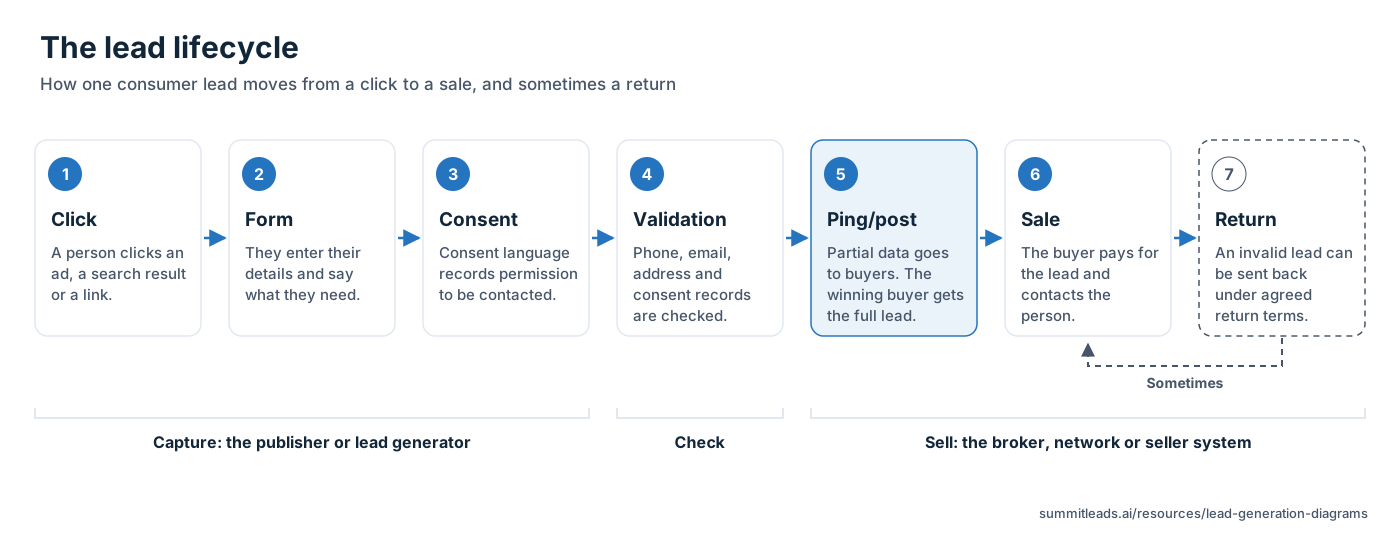
Most consumer leads pass through the same seven steps. A person clicks an ad, a search result or a link and reaches a form. They enter their details, and consent language on the form records their permission to be contacted (see TCPA consent). The lead is then validated: the phone number, email, address and consent record are checked (see lead validation). Next it is offered to buyers by ping/postPing/postA real-time selling method in which a lead is pinged to buyers with partial data, buyers bid, and the winning bidder receives the full lead by post. Glossary, and the winning buyer pays for it and contacts the person. If the lead turns out to be invalid under the return terms both sides agreed, the buyer can return it.
Alt text: The lead lifecycle in seven steps: click, form, consent, validation, ping/post, sale, and a returnReturnA buyer's request for credit on a lead that fails agreed standards, such as a disconnected number, a duplicate or a lead outside the filters. Glossary that happens only sometimes.
Download: Lead lifecycle diagram SVG file or Lead lifecycle diagram PNG file, 1600 pixels wide.
Embed code (with a credit link): <img src="https://summitleads.ai/images/diagrams/lead-lifecycle.png" alt="The lead lifecycle in seven steps: click, form, consent, validation, ping/post, sale, and a return that happens only sometimes." width="1600" height="617" style="max-width:100%; height:auto" loading="lazy"><p><a href="https://summitleads.ai/resources/lead-generation-diagrams">Lead lifecycle diagram</a> by Summit Leads</p>
Ping/post auction flow diagram
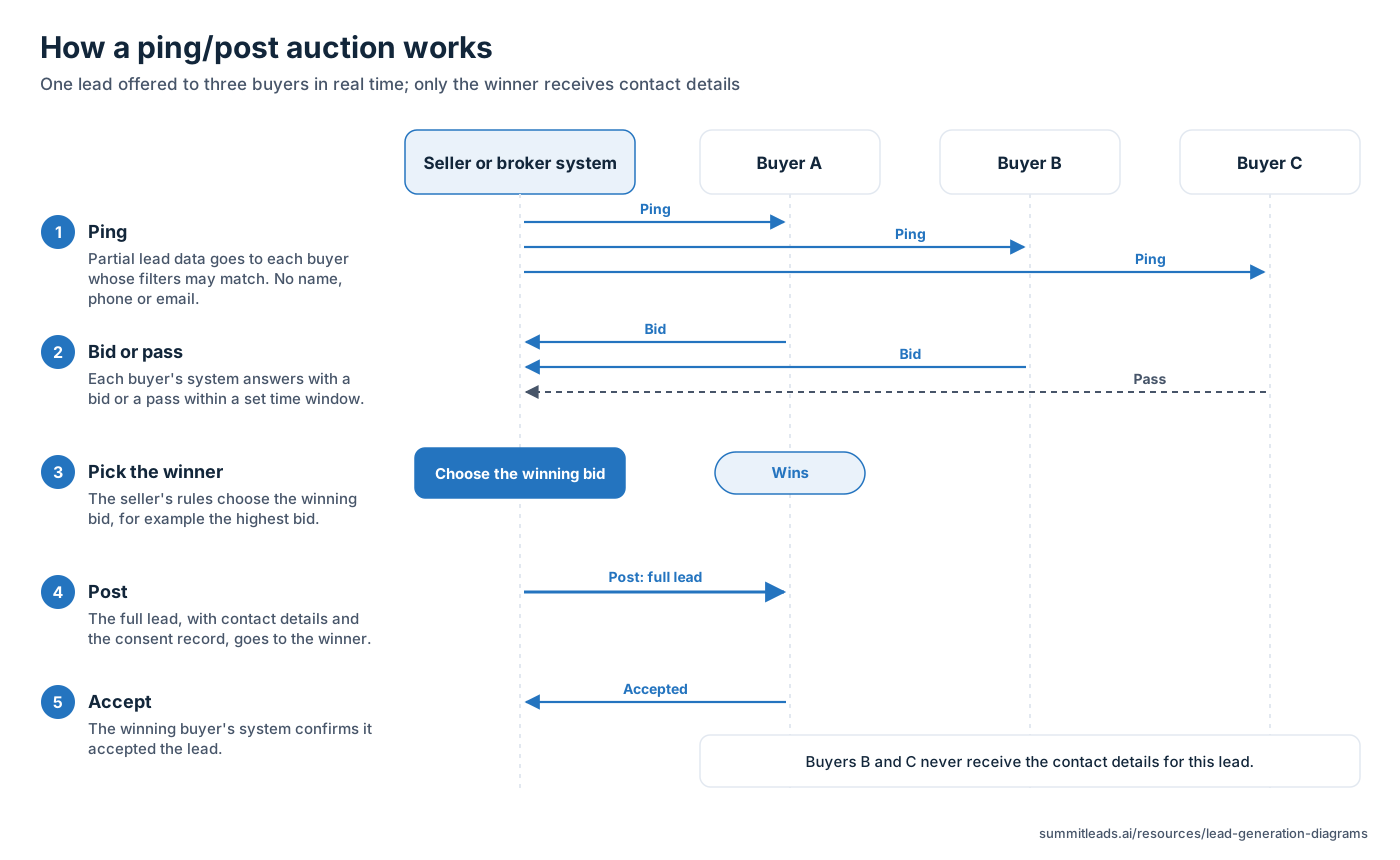
Ping/post sells one lead in two messages. The ping carries partial data, such as the state, ZIP code and lead type, but no name, phone number or email. Each buyer whose filters may match answers with a bid or a pass within a set time window. The seller system picks the winning bid by its own rules, then posts the full lead, with contact details and the consent record, to that buyer. The buyer system confirms that it accepted the lead. Buyers that passed or lost never see who the person is. In a shared sale, the post can go to more than one winning buyer. More detail is in what is a ping tree and ping post explained.
Alt text: Ping/post auction flow: a seller system pings three buyers with partial data, two bid and one passes, the winning bid is chosen, and the full lead is posted to the winner only.
Download: Ping/post auction flow diagram SVG file or Ping/post auction flow diagram PNG file, 1600 pixels wide.
Embed code (with a credit link): <img src="https://summitleads.ai/images/diagrams/ping-post-auction-flow.png" alt="Ping/post auction flow: a seller system pings three buyers with partial data, two bid and one passes, the winning bid is chosen, and the full lead is posted to the winner only." width="1600" height="983" style="max-width:100%; height:auto" loading="lazy"><p><a href="https://summitleads.ai/resources/lead-generation-diagrams">Ping/post auction flow diagram</a> by Summit Leads</p>
Publisher to broker to buyer diagram
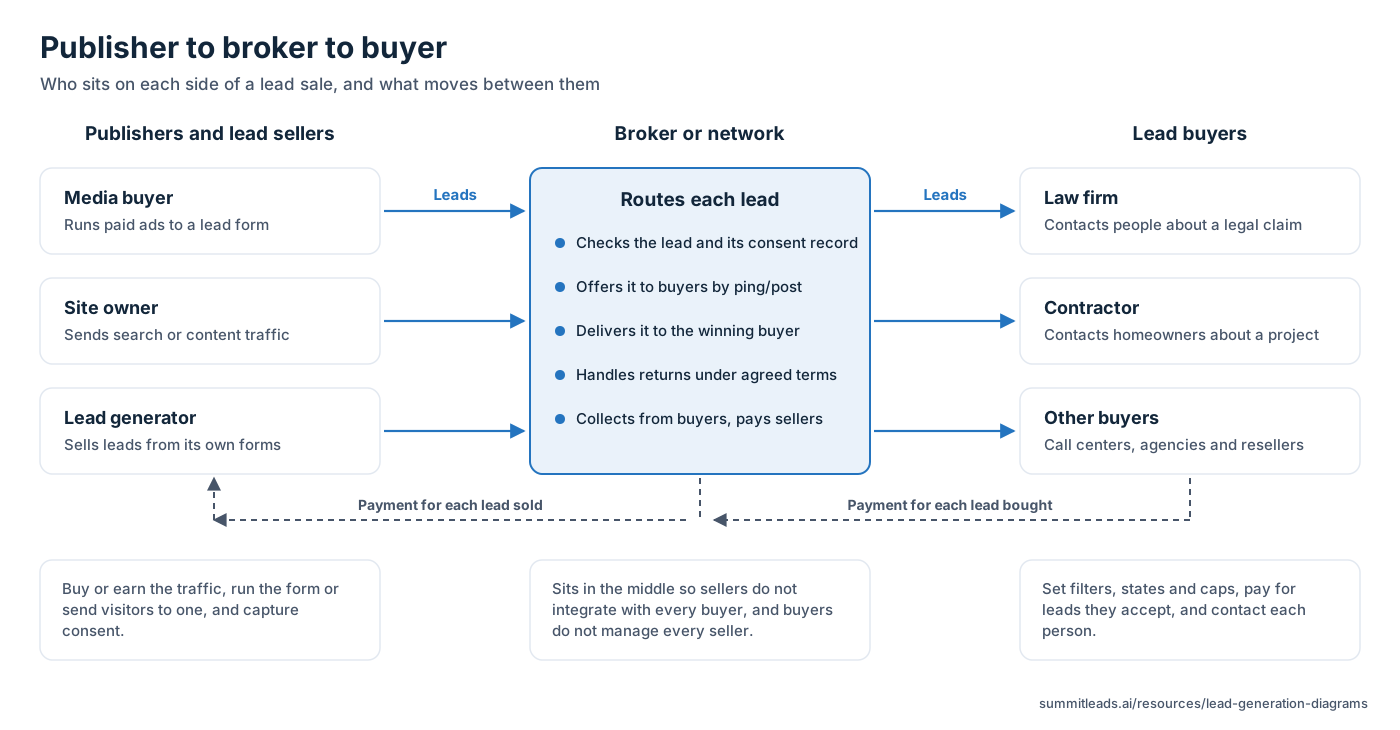
Most lead sales involve three parties. Publishers and lead sellers produce the leads: media buyers run paid ads to a form, site owners send search or content traffic, and lead generators sell leads from their own forms. A broker or network sits in the middle. It checks each lead and its consent record, offers it to buyers by ping/post, delivers it to the winner, handles returns under agreed terms, and passes payment from buyers to sellers. Buyers such as law firms and contractors set their filters, states and caps, pay for the leads they accept, and contact each person. See what is a lead broker.
Alt text: Publishers and lead sellers send leads to a broker or network, which checks and routes each lead to buyers such as law firms and contractors. Payment moves back the other way.
Download: Publisher to broker to buyer diagram SVG file or Publisher to broker to buyer diagram PNG file, 1600 pixels wide.
Embed code (with a credit link): <img src="https://summitleads.ai/images/diagrams/publisher-broker-buyer.png" alt="Publishers and lead sellers send leads to a broker or network, which checks and routes each lead to buyers such as law firms and contractors. Payment moves back the other way." width="1600" height="834" style="max-width:100%; height:auto" loading="lazy"><p><a href="https://summitleads.ai/resources/lead-generation-diagrams">Publisher to broker to buyer diagram</a> by Summit Leads</p>
How one consumer becomes an MVA or auto insurance lead
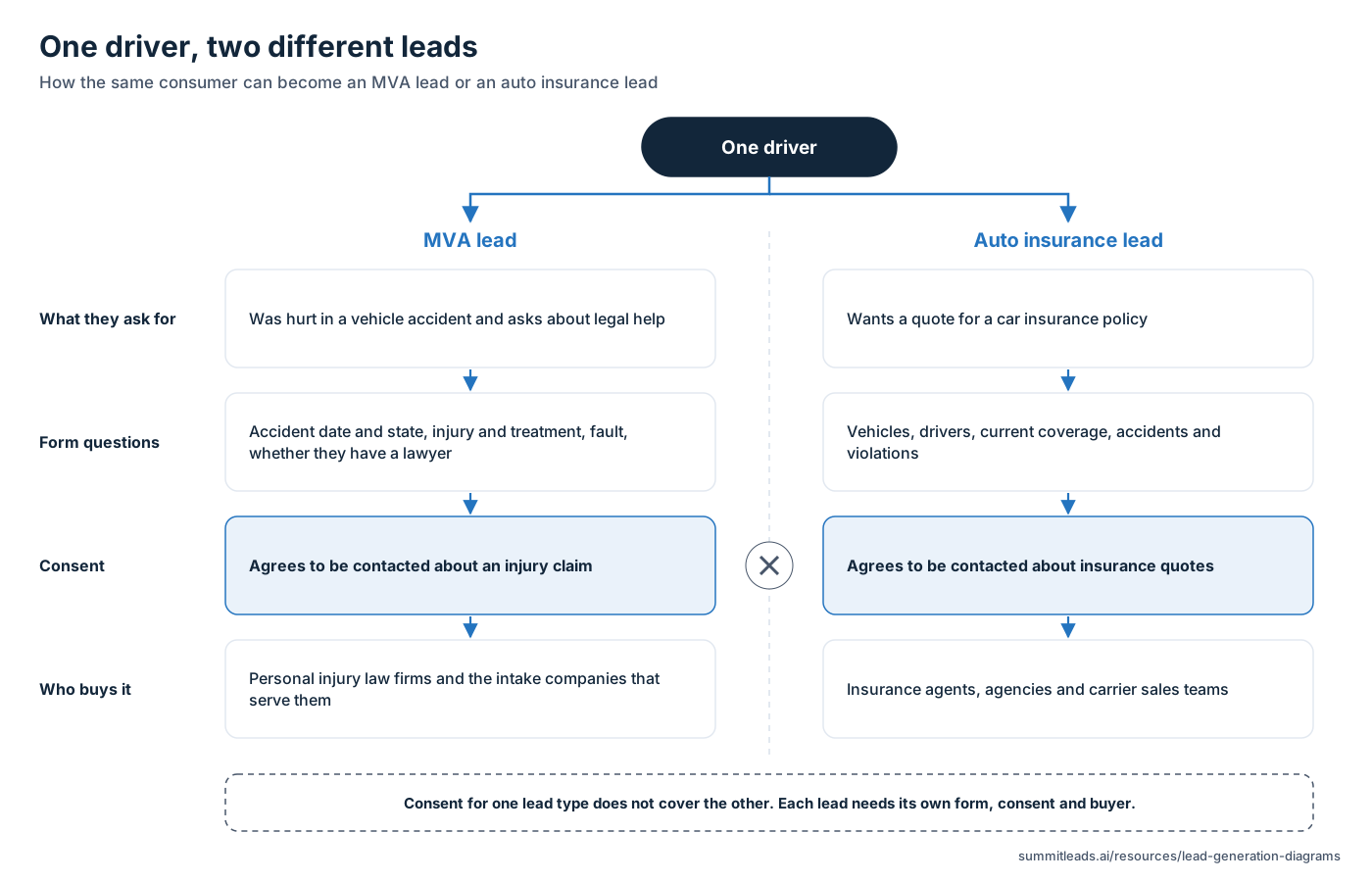
One driver can create two different leads. If they were hurt in an accident and ask about legal help, the form asks about the accident, the injury, fault and whether they already have a lawyer, and personal injury law firms buy the lead. If they ask for a car insurance quote, the form asks about vehicles, drivers and current coverage, and insurance agents and agencies buy it. Consent on each form covers the contact the person agreed to. Consent given for insurance quotes does not cover a call from a law firm, and the reverse is also true, so each lead needs its own form, consent and buyer. See MVA leads vs auto insurance leads.
Alt text: One driver can become an MVA leadMVA leadA motor vehicle accident lead: a person injured in a car, motorcycle, commercial vehicle or rideshare accident who is looking for legal help. Glossary or an auto insurance lead through separate requests, forms, consent and buyers. Consent for one lead type does not cover the other.
Download: One driver, two different leads diagram SVG file or One driver, two different leads diagram PNG file, 1600 pixels wide.
Embed code (with a credit link): <img src="https://summitleads.ai/images/diagrams/one-driver-two-leads.png" alt="One driver can become an MVA lead or an auto insurance lead through separate requests, forms, consent and buyers. Consent for one lead type does not cover the other." width="1600" height="1029" style="max-width:100%; height:auto" loading="lazy"><p><a href="https://summitleads.ai/resources/lead-generation-diagrams">One driver, two different leads diagram</a> by Summit Leads</p>
How to use and credit these diagrams
The diagrams are free to use on websites, in articles, in slide decks and in training material. Credit Summit Leads with a link to this page. The embed code under each diagram already includes that credit link.
- Use the SVG file on web pages and in print. It stays sharp at any size, and its text can be read by search engines and screen readers.
- Use the PNG file where SVG files are not accepted, such as some slide tools and social posts.
- Keep the alt text, or write your own that describes the same steps.
- Do not edit a diagram so that it names a company or appears to show one company's setup.
Frequently asked questions
What is the lead lifecycle?
The lead lifecycle is the path a consumer lead takes from the first click to the sale: click, form, consent, validation, ping/post, sale and, sometimes, a return. Each step is covered in the lead gen guide.
Can I use these diagrams on my own site?
Yes. Download the SVG or PNG file, or copy the embed code, and credit Summit Leads with a link to this page. The embed code includes the credit link.
Do these diagrams show how Summit Leads routes its leads?
No. They show the general process used across the lead generation industry. They do not describe any one company's systems, partners or settings.
Related guides
Buying or generating leads?
Buyers: email us your verticals, states or ZIP codes, daily caps and delivery method. Publishers: email us your traffic sources, states and expected volume for MVA or home improvement offers.
Or write to team@summitleads.ai. We reply by email.
What happens next
- Step 1: You email us.
- Step 2: We reply by email.
- Step 3: Return terms are agreed on the onboarding call, before you go live.